An intro to engagements
Table of Contents
Engagements allow you to target messages to the people chatting to your chatbot, depending on where and when they are chatting.
Welcome messages are part of engagements, and can be set up with other engagements in the actions section of the portal. Your chatbot comes with a default welcome message, which you can customise.

What is an engagement?
An engagement is a message or group of messages, and/or live chat request, sent by your chatbot when certain conditions are met.
Engagement messages can take the form of rich text (including formatting and links) and/or buttons or video carousels.
Welcome messages
Engagements can be triggered at the start of a conversation. This type of engagement is typically used for a welcome, greeting, or introduction to what the bot can do.
Targeted messages
Other types of engagements are targeted based on a specific trigger. These engagements are available on premium plans only.
Question count
Trigger engagements on question counts – eg after the bot has answered five questions. Some Helpfruit customers have used this to introduce lead capture for engaged users.
Question category
An engagement can be triggered when someone asks a question (or a set number of questions) tagged with a specific category.
Engagement event
An engagement can be triggered from another named engagement – allowing you to set up sequences of messages within the bot.
Your engagement can also be triggered by an event on a webpage – for example clicking a button on the page displays a specific message within your chatbot. Learn more.
Form completed
When a customer completes a chat form, an engagement can be triggered in addition to the standard form complete message.
This can be a good way to suggest a next action.
Form abandoned
When a customer abandons a chat form, an engagement can be triggered in addition to the standard form exit message. This could be used to offer live chat, for example, to troubleshoot any issues/frustrations.
No answer(s)
When the bot can’t return an answer, once or a set number of times, an engagement can be set to override normal behaviour after the message “I’m sorry I don’t know the answer…”. This could be used to trigger a live chat request, for example.
Live chat ended
When a live chat is ended by an agent, an engagement can be triggered. This could be useful for a feedback question or form.
Pattern matched
After a message that follows a specified pattern. This can be useful if, for example, a customer enters a tracking or reference number. Learn more.
Where can engagements be triggered?
Everywhere
Engagement appears wherever the bot appears (all channels and web pages)
Only on a specific channel
For example, only on Facebook Messenger, or only on Microsoft Teams. This can be useful if you have the same bot running on multiple channels.
Example: Education New Zealand used this engagement feature to display different engagements on Facebook Messenger to those on their web instance of Tohu, to accommodate the display constraints in Messenger.
.png)
.png)
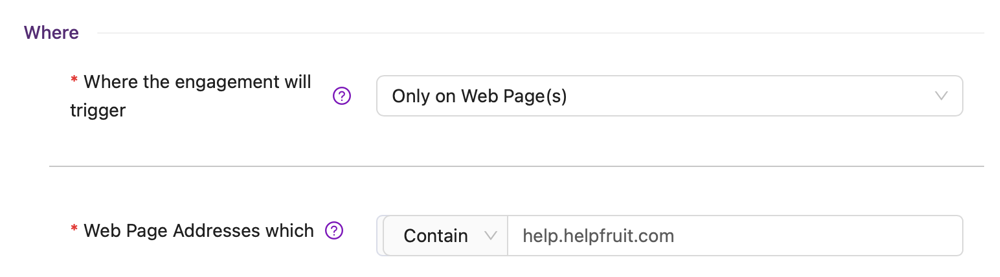
Only on a specific URL
Either a URL that starts with certain text, or a URL which contains certain text.
Example:
What kinds of engagements can I create in Helpfruit?
Engagements can be set up to:
- trigger live chat (if enabled)
- send message(s) to the user
- trigger live chat (if enabled) and send message(s) to the user
- trigger an action
Engagement messages
Engagement messages can include:
- up to two (optional) rich text messages, plus either
- buttons, or
- a video carousel
Engagement actions
Possible actions when an engagement is triggered:
- Trigger a form
- Change language
- Trigger an engagement event
Button engagements
All buttons display the button text you specify on the button.
When pressed, the button can:
- Say Button Text to the bot to process
- Say Reply Text – which is specified separately to the button text - to the bot to process
- Trigger an Action. Actions available are change language, trigger a form and trigger an engagement event
- Open a specified URL in a new tab
Video engagements
Video engagements can be set up with one or more videos in carousel format.
Videos include a Title, Subtitle and YouTube Video URL (and/or, if your chatbot also appears on Facebook Messenger, a Facebook Video URL).
Callouts
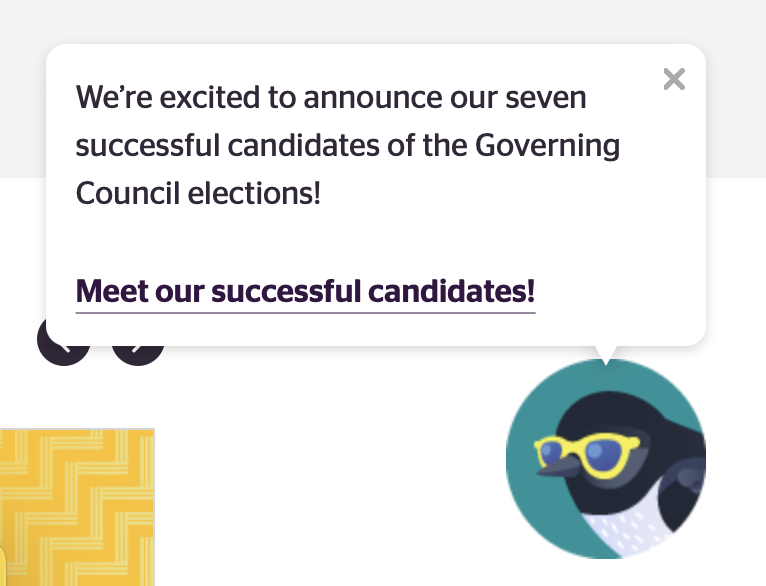
The first message in your welcome message can optionally be shown as a callout. Learn more about callouts
Where to configure your engagements
Configure engagements in the Engagements section, under Actions in the Helpfruit portal.
When you click New Engagement you’ll be able to set up your engagement.